 Shopify Migration




The online pharmacy industry is growing at a staggering pace. The global healthcare e-commerce market is projected to expand from $499.71 billion in 2025 to $587.05 billion in 2026 at a 17.5% CAGR and it's heading toward $1.12 trillion by 2030. Patients now expect to order prescriptions, refill medications, and consult pharmacists online, just as easily as buying anything else on the internet.
But here's the hard truth most developers and pharmacy owners discover too late: building an online pharmacy isn't the same as building a regular ecommerce store. The moment your website collects, stores, or transmits patient health data which any real online pharmacy does you're legally required to comply with HIPAA, the Health Insurance Portability and Accountability Act.
Non-compliance isn't just a legal risk. Healthcare data breaches cost an average of $10.93 million per incident, making healthcare the most expensive industry for data breaches. HIPAA penalties can reach up to $1.919 million per violation type annually. One avoidable mistake could shut your business down before it properly launches.
The good news? Magento (Adobe Commerce) is one of the best platforms for building HIPAA-compliant online pharmacy stores. It gives you the flexibility, security controls, and extension ecosystem needed to meet every compliance requirement without sacrificing the ecommerce features your customers need.
This guide is for you if you are:
- A pharmacy owner looking to launch or upgrade your online store
- A healthcare startup building a pharmacy or medical supply platform
- A Magento developer tasked with making a pharmacy store HIPAA-compliant
- A business owner exploring ecommerce in the pharma or healthcare space
By the end of this guide, you'll have a clear, actionable roadmap to build a fully HIPAA-compliant online pharmacy on Magento from understanding the law to picking the right hosting and extensions.
Read More: Pharma Company Website Design: Must-Have Features
1. What Is HIPAA And Why Does It Matter for Your Online Pharmacy?
HIPAA — the Health Insurance Portability and Accountability Act is the federal law in the United States that governs how organisations handle Protected Health Information (PHI). It was enacted in 1996 and has been significantly updated since, including stricter enforcement regulations that came into effect in 2025 and 2026.
HIPAA requirements are built around three core rules:
- Privacy Rule: Governs how PHI can be used and shared. Patients have the right to access their health records and control who sees their information.
- Security Rule: Sets technical, physical, and administrative safeguards to protect electronic PHI (ePHI). This is the rule most relevant to your Magento store.
- Breach Notification Rule: Requires you to notify patients and authorities within 60 days if a data breach involving PHI occurs.
Under HIPAA, Protected Health Information (PHI) is any data that connects a person's identity to their health condition, treatment, or healthcare payment. For an online pharmacy, this includes:
- Patient names and contact details linked to a prescription
- Prescription records and medication history
- Insurance details and billing records
- Order records that link a health product to a patient's identity
- Any health assessment answers connected to a purchase
Important: Even a durable medical equipment supplier shipping CPAP machines to patients where the patient's name and diagnosis appear in order records is handling PHI under HIPAA.
What Are the Penalties for Non-Compliance?
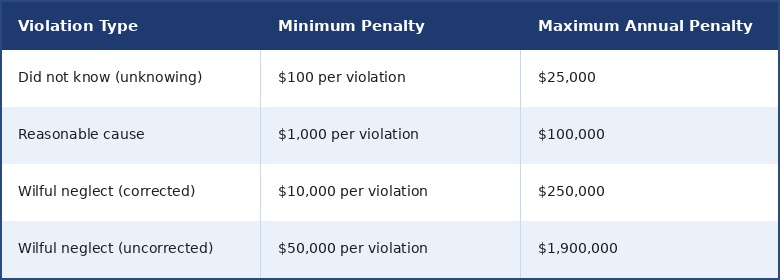
In 2025 alone, the HHS Office for Civil Rights announced ten resolution agreements in just the first five months, with fines ranging from $25,000 to $3 million. The enforcement environment has never been stricter.
2. Does Your Magento Pharmacy Store Need HIPAA Compliance?
This is the most common question and many store owners get it wrong. HIPAA does not apply to your entire website or checkout system. It applies only to the parts of your workflow that collect, store, or transmit Protected Health Information.
Here's a quick way to determine if your store needs HIPAA compliance:
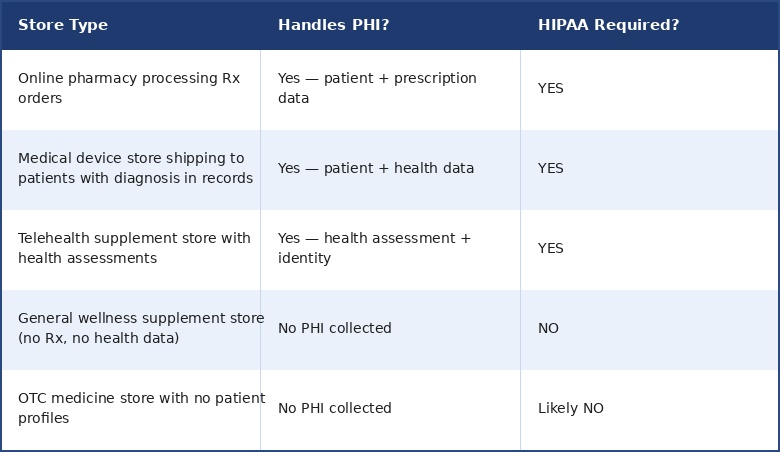
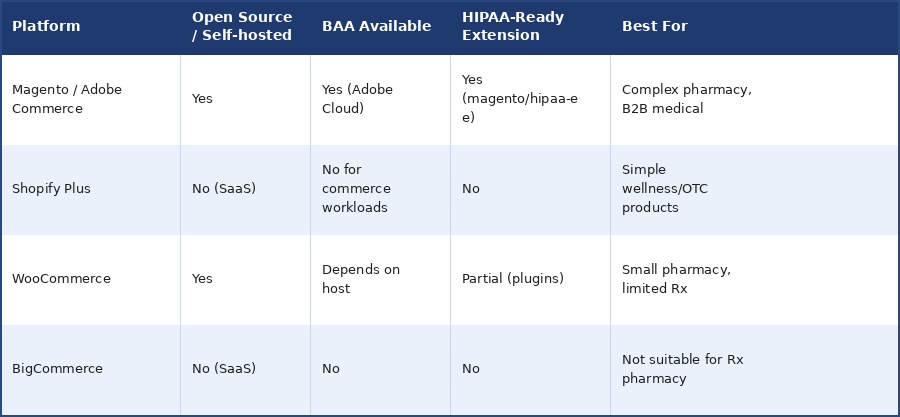
The critical mistake most pharmacy stores make is using a standard SaaS platform and assuming it handles compliance. Most SaaS commerce platforms including Shopify Plus and BigCommerce are not HIPAA compliant and cannot sign Business Associate Agreements (BAAs) for commerce workloads. This is precisely why Magento Open Source and Adobe Commerce are the preferred choices for healthcare ecommerce.
3. Why Magento Is the Right Platform for a HIPAA-Compliant Online Pharmacy
Not all ecommerce platforms are created equal when it comes to healthcare compliance. Here's why Magento stands out:
Full Control Over Your Infrastructure
Magento is self-hosted and open-source. Unlike SaaS platforms where data flows through third-party servers you don't control, Magento lets you host your store on HIPAA-compliant infrastructure and have total control over how PHI is stored, transmitted, and accessed. This is non-negotiable for HIPAA compliance.
The Official Adobe Commerce HIPAA-Ready Extension
Adobe Commerce includes a dedicated HIPAA-Ready extension magento/hipaa-ee available for Adobe Commerce on cloud infrastructure or Adobe Managed Services projects. This extension introduces audit logging for all admin and customer actions, disables non-compliant native features, and provides the structural foundation needed for HIPAA compliance.
Important: The magento/hipaa-ee extension makes Magento 'HIPAA-ready' not automatically HIPAA-compliant. True compliance requires proper configuration, HIPAA-compliant hosting, Business Associate Agreements, and documented policies. Software alone is never enough.
Magento vs. Other Platforms for Pharmacy Stores
Read More: Pharmacy Website Development Guide: Features, Compliance & Setup
4. Step-by-Step: How to Build a HIPAA-Compliant Pharmacy Store on Magento
Building a HIPAA-compliant pharmacy store is a multi-step process that combines legal requirements, technical setup, and operational policies. Here's the complete roadmap:
Step 1: Get Your Pharmacy Licenses First (Before Building Anything)
Before writing a single line of code, your pharmacy must be legally licensed. This is a prerequisite that no technology can bypass.
- Obtain a pharmacy license in your home state from the State Board of Pharmacy
- Get licensed in every state you plan to ship prescriptions to Comply with the Ryan Haight Online Pharmacy Consumer Protection Act (federal law for online Rx dispensing)
- Apply for a DEA Registration number if you plan to dispense controlled substances
- Consult a healthcare compliance lawyer regulations vary significantly by state
Step 2: Choose HIPAA-Compliant Hosting
Your hosting provider is a Business Associate under HIPAA meaning they must sign a BAA with you and meet specific security requirements. All servers, databases, and communication channels must be fully HIPAA-compliant. Not all hosting providers offer this.
Recommended HIPAA-compliant hosting options for Magento:
Adobe Commerce Cloud:The safest choice Adobe signs a BAA and manages compliance at the infrastructure level.
AWS HIPAA-Eligible Services:Amazon offers a robust set of HIPAA-eligible services including EC2, RDS, and S3 with BAA support.
Microsoft Azure Healthcare:Azure provides HIPAA/HITECH compliant cloud infrastructure with BAA agreements.
Managed Magento Hosts (e.g., Nexcess):Verify BAA availability directly not all plans qualify.
Key question to ask any host: 'Will you sign a Business Associate Agreement (BAA) for our Magento deployment?' If the answer is no, move on.
Step 3: Install and Configure the Adobe Commerce HIPAA-Ready Extension
For Adobe Commerce on cloud infrastructure, the magento 2 extension is the official starting point. Here's how to install it:
- On your local workstation, navigate to your Adobe Commerce cloud project directory
- Add the metapackage to Composer: composer require magento/hipaa-ee
- Update package dependencies: composer update
- Add, commit, and push the updated code to your cloud environment
- Verify installation via SSH: bin/magento module:status | grep Magento_Hipaa
- All modules prefixed with Magento_Hipaa must show as enabled Key features this extension enables:
- Audit Logging records every Admin user and customer action, including API calls
- Enhanced Access Controls restricts PHI access to authorised roles only
- Automatic disabling of non-HIPAA-compliant native features
- Data Connection compliance for Adobe Experience Platform integration
Step 4: Implement the Three Core Technical Safeguards
HIPAA's Security Rule requires three types of technical safeguards. Here's what each means for your Magento store:
Technical Safeguards: Data encryption for stored and transmitted data (AES-256 at rest, TLS 1.2+ in transit), secure user authentication with multi-factor authentication, automatic session logoff, complete audit logging, and role-based access controls (RBAC) so only authorised personnel access PHI.
Administrative Safeguards: Appoint a HIPAA Security Officer, create written data handling policies, conduct annual risk assessments, run employee training programmes, and maintain detailed compliance documentation.
Physical Safeguards: Secure physical access to servers (handled by your HIPAA-compliant host), proper workstation security, and media disposal procedures for any physical storage containing PHI.
Step 5: Set Up Prescription Upload and Verification
This is the feature that makes your pharmacy store actually functional and it must be implemented securely. Customers need to upload prescriptions, and your pharmacists need to verify them before fulfilling orders.
Recommended Magento extensions for prescription management & Key configuration requirements:
- Restrict accepted file types to PDF, JPG, JPEG, PNG only
- Set file size limits (recommended: max 10MB per prescription file)
- Require prescription upload for Rx-only products at the product level
- Encrypt stored prescription files never store in plain text
- Build an admin dashboard for pharmacist review and approval
- Log all prescription approval/rejection actions in the audit trail
Step 6: Sign Business Associate Agreements with All Vendors
Under HIPAA, every vendor who touches PHI on your behalf is a Business Associate and must sign a BAA. This is one of the most overlooked compliance requirements for online pharmacies.
You need BAAs with:
- Your hosting provider (e.g., AWS, Azure, Adobe Commerce Cloud)
- Your email service provider (e.g., SendGrid, Mailchimp check HIPAA plans)
- Your payment processor (Stripe, Braintree verify HIPAA eligibility)
- Any analytics or CRM platform that receives customer data
- YourMagento development agency
- Any third-party extension vendors who access your store data
If a vendor refuses to sign a BAA, you cannot legally use their service for any workflow that involves PHI. Period.
Step 7: Secure Your Checkout and Payment Flow
Your checkout process handles both PHI (prescription/health data) and payment card data meaning you must comply with both HIPAA and PCI DSS simultaneously.
- Use SSL/TLS encryption across all pages not just the checkout
- Where possible, collect PHI through a separate HIPAA-compliant form before the payment checkout begins
- Never store prescription notes or health data in plain-text order comments
- Use a payment gateway that supports HIPAA BAA or separates PHI from payment processing
- Implement two-factor authentication (2FA) for all admin accounts
Step 8: Implement Ongoing Monitoring and Compliance Maintenance
HIPAA compliance is not a one-time setup. It's an ongoing process:
- Conduct annual HIPAA risk assessments
- Review and update security policies regularly
- Monitor audit logs for unauthorised PHI access
- Apply Adobe Commerce security patches monthly (Adobe now releases patches monthly as of March 2026)
- Train staff on HIPAA policies at least once per year
- Have a documented Breach Response Plan ready before launch
Read More: Magento (Adobe Commerce) 2.4.8-p2 Security Patch: What You Need to Know
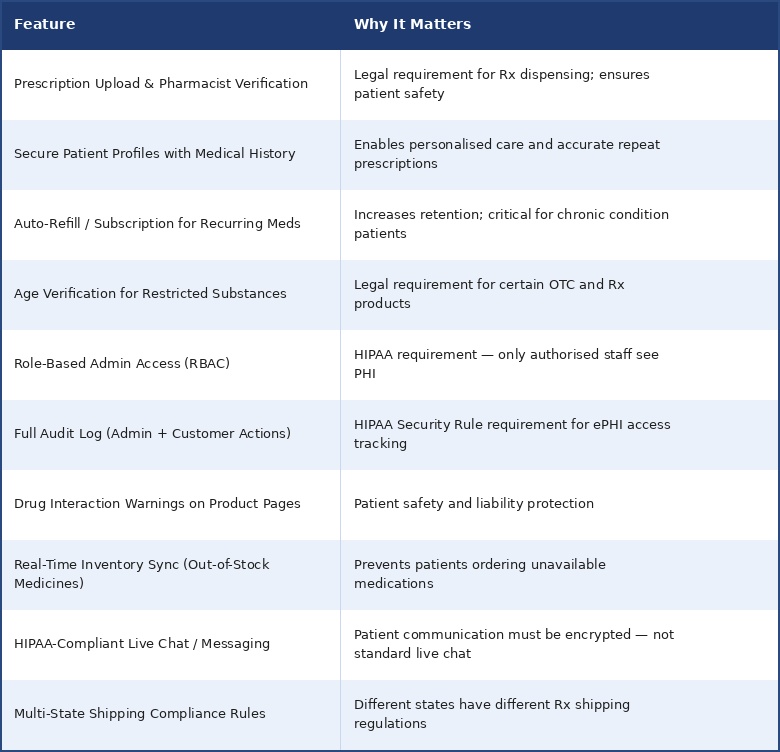
5. Must-Have Features for Your Magento Pharmacy Store
Beyond HIPAA compliance, a successful online pharmacy needs these essential features to serve patients well and operate efficiently:
6. Recommended Magento Extensions for Pharmacy Stores
Choosing the right extensions is critical. Here are the vetted extensions that work well for HIPAA-compliant pharmacy stores:
| Extension | Purpose | HIPAA Relevance |
|---|---|---|
| Magento 2 Order Attachment | Secure prescription file uploads | PHI data handling |
| Magento 2 Two-Factor Authentication | Secure admin login | Access control requirement |
| Magento 2 Age Verification | Restrict controlled substance sales | Legal compliance |
| Customer Attribute Extension | Custom patient profile fields | PHI data management |
| GDPR + Data Privacy Extension | Data handling compliance | Complements HIPAA for global stores |
| Magento 2 Audit Log Extension | Enhanced action logging | HIPAA audit trail requirement |
7. How Much Does It Cost to Build a HIPAA-Compliant Magento Pharmacy Store?
Costs vary significantly depending on the complexity of your store, your hosting choice, and the level of customisation needed. Here's a realistic breakdown:
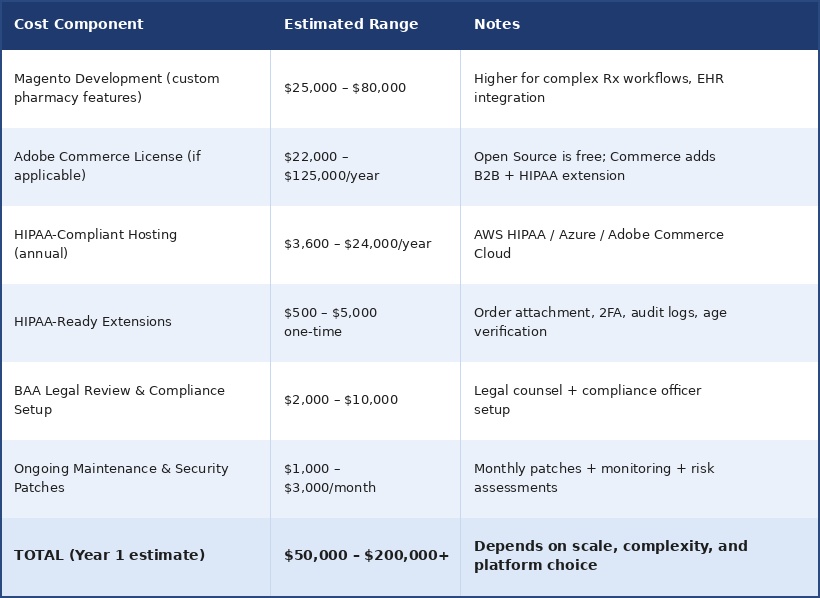
Working with an experienced Magento agency in India (like VDCStore) can reduce development costs by 40–60% compared to US or European agencies, without compromising on quality or compliance standards.
8. Common HIPAA Mistakes Online Pharmacies Make (And How to Avoid Them)
These are the most common and most costly mistakes we see pharmacy stores make:
Mistake 1: Assuming the Platform Handles All Compliance
The magento/hipaa-ee extension makes your store 'HIPAA-ready' — not automatically compliant. True compliance requires proper configuration, ongoing maintenance, and documented operational policies. Never assume software alone is sufficient.
Mistake 2: Not Signing BAAs with All Vendors
Many stores sign a BAA with their hosting provider but forget about their email service, analytics platform, CRM, or live chat tool. Every vendor who touches PHI in any capacity needs a signed BAA. Missing even one can be a compliance violation.
Mistake 3: Using Standard Email for Prescription Communication
Regular email (Gmail, Outlook) is not HIPAA compliant. Sending prescription details or patient health information via standard email is a direct HIPAA violation. Use a HIPAA-compliant encrypted messaging solution for all patient communication.
Mistake 4: Storing PHI in Plain-Text Fields
Order comments, notes fields, and customer notes in Magento are not encrypted by default. Storing prescription details, health conditions, or insurance information in these fields exposes PHI. All PHI must be stored in encrypted, access-controlled fields.
Mistake 5: Skipping Staff Training
The most common cause of HIPAA violations is human error not technical failures. Untrained staff sharing login credentials, discussing patient information in insecure channels, or mishandling prescription records are your biggest risk. HIPAA requires documented, regular staff training programmes.
Mistake 6: No Breach Response Plan
HIPAA's Breach Notification Rule requires you to notify affected patients and the HHS within 60 days of discovering a breach. If you don't have a documented response plan in place before a breach occurs, you will almost certainly miss this deadline dramatically increasing your penalties.
9. Frequently Asked Questions
Is Magento HIPAA compliant out of the box?
No. Standard Magento is not HIPAA compliant out of the box. Adobe Commerce with the magento/hipaa-ee extension on HIPAA-compliant hosting is the path to compliance but it still requires proper configuration, BAAs with all vendors, and documented operational policies.
What is the magento/hipaa-ee extension?
It is Adobe's official HIPAA-Ready extension for Adobe Commerce on cloud infrastructure or Adobe Managed Services. It enables audit logging for all admin and customer actions, adds access controls, and disables non-compliant native features. It is the official starting point for HIPAA compliance on Magento but not the finish line.
Does my pharmacy store need HIPAA compliance if I only sell OTC medicines?
If you are only selling over-the-counter medications without collecting any patient health information, prescription records, or linking purchases to health conditions, you likely do not need HIPAA compliance. However, once you add patient profiles, health assessments, or prescription products, HIPAA applies. Consult a healthcare compliance attorney to confirm your specific situation.
Can I use Shopify for an online pharmacy?
Shopify Plus cannot sign BAAs for core commerce workloads and is not suitable for pharmacies that handle PHI. For simple wellness or OTC product stores with no health data, Shopify may work. For any pharmacy handling prescriptions or patient health information, Magento or another self-hosted, HIPAA-compliant platform is required.
What hosting is best for a HIPAA-compliant Magento store?
Adobe Commerce Cloud (which includes a BAA with Adobe), AWS HIPAA-eligible services, and Microsoft Azure Healthcare are the top choices. The key requirement is that your host must be willing to sign a Business Associate Agreement (BAA) and maintain HIPAA-compliant infrastructure.
How long does it take to build a HIPAA-compliant Magento pharmacy store?
A basic HIPAA-compliant Magento pharmacy store typically takes 3–5 months for development, testing, and compliance configuration. More complex stores with EHR integration, custom Rx workflows, insurance processing, or multi-state shipping rules can take 6–9 months. The compliance and legal setup (BAAs, policies, staff training) adds additional time on top of development.
10. HIPAA Compliance Checklist for Your Magento Pharmacy Store
Use this checklist before launching your online pharmacy:
Legal & Licensing
- State pharmacy licence obtained for home state
- Pharmacy licences obtained for all states you ship to
- Ryan Haight Act compliance confirmed
- DEA registration (if dispensing controlled substances)
- Healthcare compliance lawyer consulted
Technical Setup
- Adobe Commerce HIPAA-Ready extension (magento/hipaa-ee) installed
- HIPAA-compliant hosting provider selected
- AES-256 encryption enabled for data at rest
- TLS 1.2+ encryption enabled for all data in transit
- SSL certificate active across entire website
- Two-factor authentication (2FA) enabled for all admin accounts
- Automatic session logoff configured
- Role-based access controls (RBAC) configured
- Audit logging enabled for all admin and customer actions
- Prescription upload system installed and tested
- Pharmacist review/approval workflow configured
Business Associate Agreements
- BAA signed with hosting provider
- BAA signed with email service provider
- BAA signed with payment processor
- BAA signed with analytics platform
- BAA signed with CRM/marketing tools
- BAA signed with development agency
Policies & Operations
- Written HIPAA Privacy Policy published on website
- HIPAA Security Officer appointed
- Annual risk assessment process documented
- Staff training programme in place
- Breach Response Plan documented
- Patient rights policy (access, amendment, accounting) documented
Conclusion
Building a HIPAA-compliant online pharmacy with Magento in 2026 is entirely achievable — but it requires more than just installing a plugin and calling it done. It demands a comprehensive approach that covers legal licensing, HIPAA-compliant hosting, technical safeguards, vendor agreements, and ongoing operational policies.
The investment is real, but so is the opportunity. The healthcare e-commerce market is heading toward $1.12 trillion by 2030. Pharmacies that build compliant, trustworthy digital platforms now will have a massive competitive advantage over those scrambling to retrofit compliance later.
Magento gives you the flexibility, control, and extensibility to build exactly the kind of secure, scalable pharmacy store that modern patients expect. Combined with the right hosting, the right extensions, and the right development partner, it's the best platform available for HIPAA-compliant healthcare commerce.
Need help building a HIPAA-compliant pharmacy store on Magento?
VDCStore specialises in Magento / Adobe Commerce development for healthcare and pharma brands.
Talk to our Magento experts at vdcstore.com
About VDCStore
VDCStore is a leading Magento and Adobe Commerce development agency with deep expertise in healthcare, pharma, and B2B ecommerce. We help pharmacy brands, medical device companies, and healthcare startups build high-performance, HIPAA-ready online stores that convert patients into loyal customers.







0 Comment(s)